How it works
How Vestirix works
You install Vestirix on your Shopify store, switch it on in your theme and add a size guide. Shoppers then get a Try it on button and a size on your product pages, and you see what it does to your sales in the app.
Last updated 31 October 2026
Setting it up
- 1. Install the app. Vestirix installs from the Shopify App Store once its listing is live; stores on the pilot list are first.
- 2. Switch it on in your theme. Shopify keeps app embeds off after install. The app's Home page links straight to your theme editor with Vestirix switched on - press Save. No theme code is edited.
- 3. Add a size guide. Paste your size chart on the app's Products page and choose which products use it. Without one, a product offers the try-on but no size.
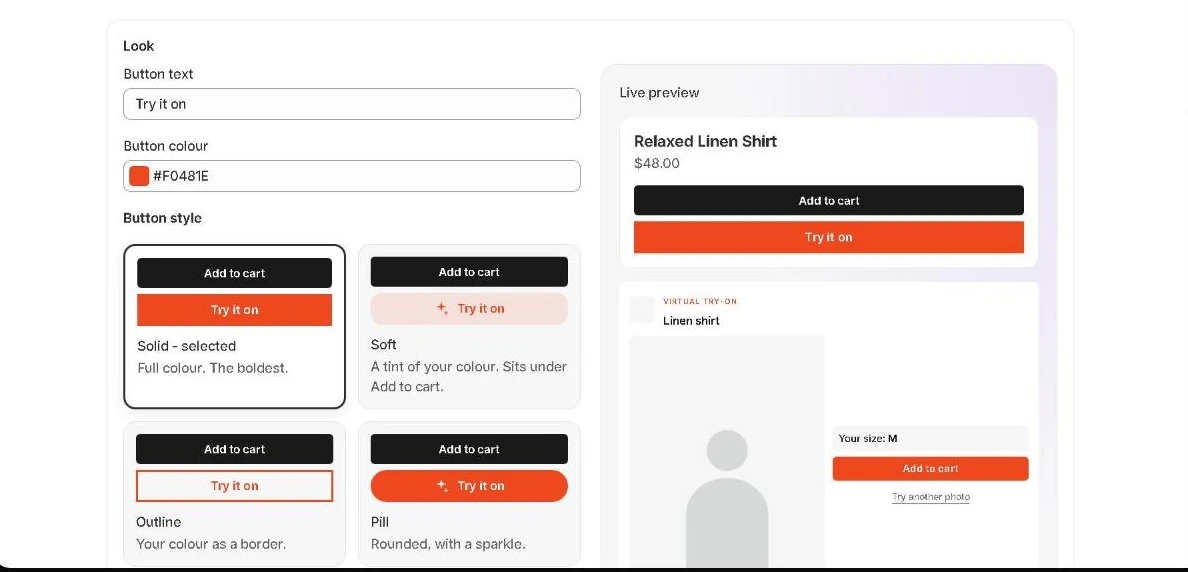
- 4. Make it yours. Button text and colour, seven button styles and seven pop-up styles - including Halloween and Christmas - with a live preview in Settings. Optionally choose exactly where the button sits on your product page.
What your shopper does
- Taps Try it on under Add to cart.
- Picks one photo. About half a minute later they see your product on themselves.
- Gives their height and preferred fit, and gets one size, selected on the page.
- Adds it to the cart from the pop-up.
Their photo is deleted within the hour. Details: privacy.
What you see in the app
Three pages in Shopify admin. Home shows try-ons, add to carts, orders and revenue for any range from 7 days to all time. Products holds your size guides and the per-product switch. Settings is the screen above.
Home also answers the question the others cannot: your conversion against a comparison group of shoppers who never saw Vestirix, so the effect is measured rather than claimed. How the comparison works. It also lists the sizes your shoppers need, and warns you when a needed size is out of stock.
Every screen, and a 43-second walkthrough of the real app, are on the demo page.
Staying in control of cost
You pay per try-on - see pricing. You set a spending cap, and Shopify refuses any charge past it. A daily limit per shopper and per product stops one person running up your bill.
Questions
How long does setup take?
Install, switch the app embed on in your theme editor, and add a size guide. The app gives you a link that opens the theme editor with Vestirix already switched on; you press Save.
Which pages does Vestirix appear on?
Product pages only. You can switch try-on off for any product in the app, and pause Vestirix for the whole store at any time without losing anything.
What happens when my free try-ons run out?
You approve billing in the app's settings. Until you do, the button stays on your store and the pop-up tells shoppers try-on is not available right now - it never takes a photo it cannot process, and never charges you without approval.